Tuesday, August 15, 2006

black and white

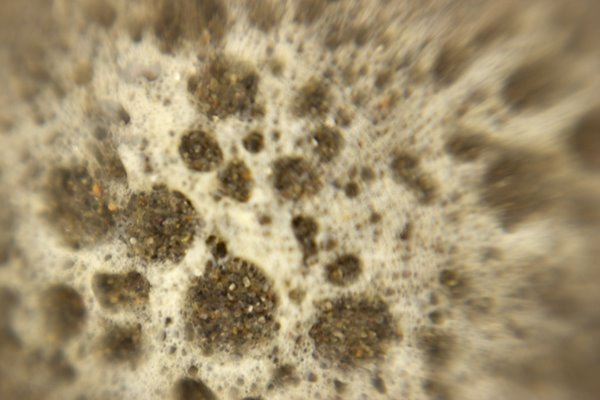
photo macro close up of shell with bluring on sides, mostly grey
really grayscale. i think maybe my latest beach photo, a lensbaby interpretation of a broken shell, is better as a grayscale cuz when i converted it, out popped this face!
so the color was a distraction from the form. it was the color of the grains of sand.
but to add interest i reduced the opacity of the layer that i used for the channel mixer and let a little color thru. this actually made it eery - like a skeleton!

Thursday, August 10, 2006

beach again and color

This morning i went down to the cold foggy, windy beach with my camera, lensbaby attached, and took sand pictures. Fun to revisit the subject from the warped perspective of the lensbaby. But i had the strongest macro lens on and that meant being inches from the subject. So i'm down on my knees in the wet sand, keeping one eye and both ears on the surf so i can jump up when the occasional larger wave sends more wet bubbles my way. I got out of the way every-time but i was wet and very cold at the end. The pics are interesting. see it you can see it with the profile - maybe open in photoshop too see the warm colors - the foam i was shooting was yellower than the foam that disappeared quickly.

macro shot of sand and foam at the beach with strong blur from lensbaby

I've been so wrapped up in working on my widows. following my teaching advise to test your application. I thought i had a great solution to the challenges of transferring photos to the glass when i decided i did not like the look at all and now i've switched to other materials. So i'm back to experimenting before i print out and transfer. the interesting part is trying to get the color i want. When i first thought of transferring images it was because i wanted to move a picture with perfect color from a paper with controllable attributes like a paper profile and consistent professional level paper production to a surface that was more artistic but without the controllability - watercolor paper, canvas etc.
The method for doing that is hard because it involved rubbing off the paper from the back of the acrylic gel emulsion. this killed my hands. So i started working with overhead transparencies and lazertran. they don't have profiles but they seem well made. But with the overhead transparencies i had problems getting clean transfers when i worked big, so i switched to lazertran for my big project. I'm currently in the middle of doing color tests. changing one thing at a time, printing out swaths of color waiting for things to dry, then transfer it and wait for that to dry and then compare with the image on the screen. painfully slow. But the color is important to me. when i worked with the overhead transparencies the first time i was so excited about getting the image to stay on the window that i did not work to correct color problems. but then it slowly got to me, how it was off. Also that it was too distressed ( places of lift where the ink does not transfer). I feel like maybe i'm crazy cuz no one else i know tests this much.
maybe i like testing! i'm the daughter os a scientist afterall ya know!
I have also been working on generating a handout that was supposed to be given for my last workshop. Oh boy, the dangers of cut and paste! the material is mostly a compilation of information at the Golden and Lazertran websites, with some quoted material from the yahoo group, with my running commentary throughout. Boy is it long! It was so unwieldy that i had to actually make an outline to determine the organization i'd given it and rewrite the outline to get things is a more comprehensible order. I can't remember the last time i outlined something!!! I guess i'll ost it here when i'm done.

Friday, July 21, 2006

teaching again

I am so happy to be teaching again!
I had not been teaching the elders at El Cerrito as of late because their schedules were not working with mine.
Then we moved to San Francisco.

Right after moving across the bay I was in a group art show. Art on the Avenues with the Sunset Artists Society. It was my first juried show. I brought along several works in progress. This created many opportunities for conversation. Over and over people said i should give a workshop.

So I did!

It was so much fun for me and the participants.
The class was about transfer technologies and people who came were artists. Photographers especially.

Things i liked about giving the workshop:
It was all my own curriculum, I was not working with someone else's idea of what should be taught.

We explored some new things and some things that are still experimental - that i have been experimenting with.

The people in attendance were highly competent, they were good artists and well versed in using their media.

Somehow it was fun. I'd like to see the key to that cuz sometimes a class won't be and i'm not sure what makes the difference.

Of course i did way too much prep work for it. but i'm assuming that i will get ready with less effort if i do it again.

I also will think more seriously about giving other workshops. I have many in the planning stages.

Since i posted last I have updated my website. See the link above.

Friday, March 03, 2006

e-mailing posts - i still have to

well i'm really not sure i understand the e-mailing posts feature. today i signed on for the first time since i sent in the e-mail posting. it wasn't posted but was saved as a draft so that i could hit the publish button today. very useful! not.
oh dear and look at that formating! what a mess. oh well.

Wednesday, March 01, 2006

test the e-mail posting feature

Today I''m testing 2 features. one is the ability to send the blog to
someone by e-mail. if that worked, and you know who you are, leave a
comments so i know. i've opened up commenting so you can post a comment
even if you aren't a member of blogspot.
the other feature is the ability to e-mail in my blog. with this
feature i write up my blog in my email program and hit send and we'll
see how it turns out.
I suppose this would be useful if you only had dial up.

what happens to a photo when I post it here

I've been experimenting with what happens to a photo when i post it here. I had made a large file for my daughter to print at school. it was a jpeg but i'd saved it with a resolution of 300 and kept the size at about 5 by 5. When i uploaded it here and then right click to save back on my hard drive, the fine folks here at blogspot had kept the dimensions but dripped the resolution to 72. So this is definitely not the way to share a file that you want your grandma to download and print. This is very interesting!

my girl

Here's a shot of my girl, ain't she the best!

Sunday, February 26, 2006

waitng too long

I've been away too long. I was busy with my mom who had an operation, and then i finally had time to address the mess i left my studio in. My studio is a corner or the cottage in the back of our house. i suppose it used to be the garage. It's just one big open space with no insulation. or even an inside wall, just the bare boards. One corner is my daughter's bed room, another is a sort of family room set up, which my daughter uses as part of her room, another corner is the bathroom which we really only use to wash up from my studio, and the final corner is all my art stuff. I have about 9x12 and i am grateful for that. I could use about twice the space. When i was finishing everything for the holiday fair i kinda trashed the place. and my computer was a mess, I save copies of things all over the place. Boy do i need a standard workflow.
When i returned to the studio i had to take everything off of one of my backup drives so my son could take it with him, so i sat down and painstakingly went through all the versions of all the images i have and got rid of the unnecessary duplicates and made sure i had organized backups, both on the discs and on all my DVDs. Then i looked around and saw the chaos which was my art materials. So I spent a week reorganizing all my stuff, and i still have to fix up the sewing corner. Finally I returned to the computer, knowing that i really needed to revitalize it. I spent the whole last week backing up my files and erasing my disk to nothing, reinstalling the OS, updating it; reinstalling all my software and drivers and updating that!
During this time i made some art, i made a few quickie books and took tons of pictures to experiment with new techniques. I'm looking forward to seeing the photos that i took at dawn down at monterey.

Wednesday, February 08, 2006

standup bass


I have no idea why I had trouble uploading photos in the beginning. Every time i tried to upload, i was taken to a page that wanted me to download Hello, which won't work on the mac. So i spent time finding ways to post fotos here without using Hello. But then, just the other day, here was this normal interface that let me upload fotos and post them in my blog entries. Whatever.

Here is a photo of mine. normally i love it but i'm not at my own computer and the colors don't look right. Anyway, people always want to turn this pic in a different direction because it's hard to tell what's going on. This fellow is playing the stand up bass while laying down, with the bass on his belly! I'm squatting near his head looking down the length of his body and the standup base. In the print version the rich colors and textures of the wood and his hands, contrasted with the black hat and the light greenand yellow background make for a nice abstract. If I could do it again, i'd like a little more light on his face.

Sunday, February 05, 2006

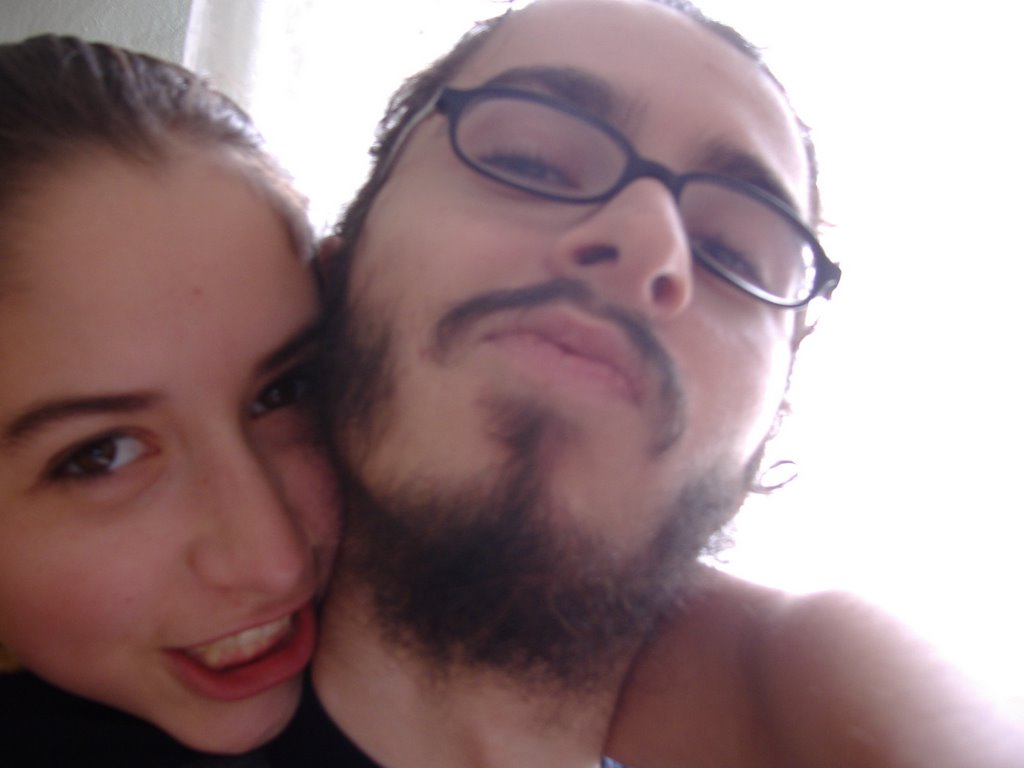
Yes that's my kids

Great shot my kids took of themselves. rule of thirds and all that! So it was very easy to upload and post that photo. but again I'm confused because the interface looks different today????

Tuesday, January 24, 2006

I love not depending on windoz

As I mentioned in an earlier post I don't like having to use windoz to do things. I have to use my husband's machine and, well, I'm just plain partial to my Mac (i love my mac! i love my mac! i love my mac!). So i was frustrated trying to post pictures here at blogger. Now i'm sure there are many ways around this but, as i understand it, to upload photos i have to use Hello, which is part of Picasa. these are all free programs that run on windows machines only. I had been testing Picasa and how it works with Hello and Blogger when i started this blog. So of course I was on my husband's machine. But I don't want to be there all the time, and my pictures are not on his machine so... to upload from there I have to move the pictures first, which is not that bad because i've networked the machines, but then i end up with extra copies all over. ugh. so I found a way around it. I have a silly blog at Xanga, just so i can make comment's on my daughter's Xanga site. But at Xanga, it's easy to upload photos, so I uploaded the photos seen below and simply copied and pasted it's link in a little html, dropped it into the blog editor and ta da! the photo shows up right smack in the middle of the post. Hurray for me!

Who wants to see my silly blog? OK here's the link. http://www.xanga.com/kaylarus

This is a fiddler at the 4th of July concert

CRW_0708

Radiantvista daily reviews photoshop workbench etc

Since i've started teaching digital photography to the elders, i have found some really fantastic educational sites about photography on the web. Radiantvista is currently my favorite. The front page has random photos that are very inspiring so that each time you drop by there's a new one.
Everyday i check out their daily critique. Brave souls send in their shots and the fellas give a detailed critique. They start with what they like best (quality of light is a big one) and go into detail about what's good about the shot. Then, about one third to one half the way through the presentation, they switch to what could be improved about the photo. It's interesting the way they can make a photo that was good look really great with a simple crop, color correction, or creative use of the spot healing brush! Then, right before the end, they summarize what's good about the photo and they always thank the folks who submitted the photo.
I love these critiques because for me it reinforces that close critical eye that we need to use when taking the shot and when editing in photoshop. (I also like to guess what improvements they will make and it's fun when I'm right)
Speaking of photoshop, there's another section of the site dedicated to showing in detail what you can do to improve a photo in photoshop. Some are basic techniques, like how to drop in a new sky, and others are more advanced, showing consistent workflow, use of masks, color correction with adjustment layers and so on.
Another part of the site has video tutorials. These are long and amazingly detailed. Like the daily critique, the videos run on quicktime which is so much better than windows media player. All you Mac users already love Apple's Quicktime but for you all still using windoz go here to download it:
http://www.apple.com/quicktime/download/win.html .
My absolute favorite tutorial is the tutorial on composition. This is the class that i had the hardest time teaching because every resource that i found had yet another take on it. But this tutorial is so comprehensive yet clear and simple it's accessible for everyone.
They also have PDF tutorials for those of you who miss reading. Seriously though, these are good for opening up photoshop and working along side. Also in PDF format are some articles, or at least the first one about "The Myth of Talent" which makes the point that you need to work at it and even if you are not that good to start out, if you keep at it you can get really good. I'm not sure this is always true. I don't think it would matter how much i practiced singing for example.
Radiantvista also has podcasts. I feel like such a techie when i download these to my iTunes and play them. Yet it's a real throw back because it's like listening to the radio. I don't own an iPod, but i suppose if i did i could listen to the shows on the run. The shows tend to go into depth about a technical subject like the one about using the RAW format to your best advantage and the latest one about how to use charts that tell you when different stages of twilight will happen where you want to shoot, so you can know when to get out and get that great landscape in the best light possible.
Why do these guys give away so much knowledge? Well besides being in love with what they do, the site also promotes their workshops. Unfortunately for me they are not giving one in my area anytime soon, but i'll be the first to know when they do! What could be improved in a perfect world? Well getting a woman photographer on board would make me feel more at home, but that's just me!
So I give the site an enthusiastic five stars.

Monday, January 23, 2006

trying to find a work around link to cancerwontkillshullady

I like this blog because I can make it look the way I want more than any other. I am testing blogs because i think that the over 50 population, like those in my digital photography class, will benefit from using blogs because the can communicate with friends and family in a creative way. I have a friend who is using a blog as a journal throughout her battle against breast cancer. It really seems to work for her both as a journalling tool and a way to keep everyone informed of her progress. For me this would be a great way to create an artist's journal, but i have a technical difficulty that i must find a work around for. The usual way to post pictures is using picasa and hello. but those only work on a windoz box. which i could manage if i had to cuz after all my dear husband has one of those machines i love to hate like the bad girl in a soap opera. but i don't want to! i take it as a personal challenge whenever i find something that won't work with a mac! I think the work around is the link aspect. If i can upload the pictures anywhere on the web i will be able to link to it and it'll show on my blog. well enough for today.

Sunday, January 22, 2006

trytryagain link to dancingmyassoff blog


this is a pic of my daughter and friends that she messed with is photoshop express. I'm using that version of photoshop so that i can teach it to the elders in el cerrito. it is different than photoshop cs, most notably in its lack of curves. but as my daughters' photo shows, you can still do cool things with it. I posted it here using picasa and hello from my husband's computer. originally the idea was to link it to her blog over at xanga. it seemed to work at first but then it became moody so i figured out how to upload pics to xanga so she could link to it at her site directly.

Monday, October 31, 2005

welcome


So I started this in order to try it out to show the elders in my digital photo class at the senior center how to do it.
Now to figure out how to post a picture!